HubSpot Integration
📘 Overview
Vamu connects with HubSpot to track employee access, helping you ensure proper access levels and stay compliant with user permission policies.
🔐 HubSpot OAuth Authorization Flow
-
Log into your Vamu account:
👉 https://app.vamu.io -
From the left-hand panel, go to Automation → Integrations.
-
Search for HubSpot Integration and click Connect.
-
A modal window will appear with a "Grant Vamu Access" button.
-
Click the "Grant Vamu Access" button to open HubSpot’s OAuth consent screen.
-
Log into your HubSpot account if not already authenticated.
-
Choose an account.

- You’ll be redirected back to Vamu and see a confirmation message.
✅ HubSpot is now successfully connected.
🧾 HubSpot API Scopes & Their Usage
Vamu requests only the following minimum necessary scopes from Zoom:
| Scope | Why It’s Needed |
|---|---|
oauth | Required to securely connect HubSpot with Vamu |
settings.users.read | To list all users in the HubSpot account |
These scopes are read-only and used strictly to support access tracking and compliance evidence generation.
⭐ Core Features (User Perspective)
After connecting your HubSpot account, Vamu enables you to:
-
Navigate to Access Control from the left-hand panel.
-
Select HubSpot integration from integration list.
-
View:
- A complete list of HubSpot users within the account.
- Their assigned roles (e.g., Admin, Member).
-
Use this data to support your access control policies and compliance reviews.
🔌 Disconnecting the Zoom Integration
To revoke the integration:
-
Log into your Vamu account:
👉 https://app.vamu.io -
Go to Automation → Integrations.
-
Find HubSpot Integration and click Disconnect.
-
Log into your HubSpot account:
👉 https://www.hubspot.com/ -
Go to your account.
-
Click the Settings (⚙️) icon.
-
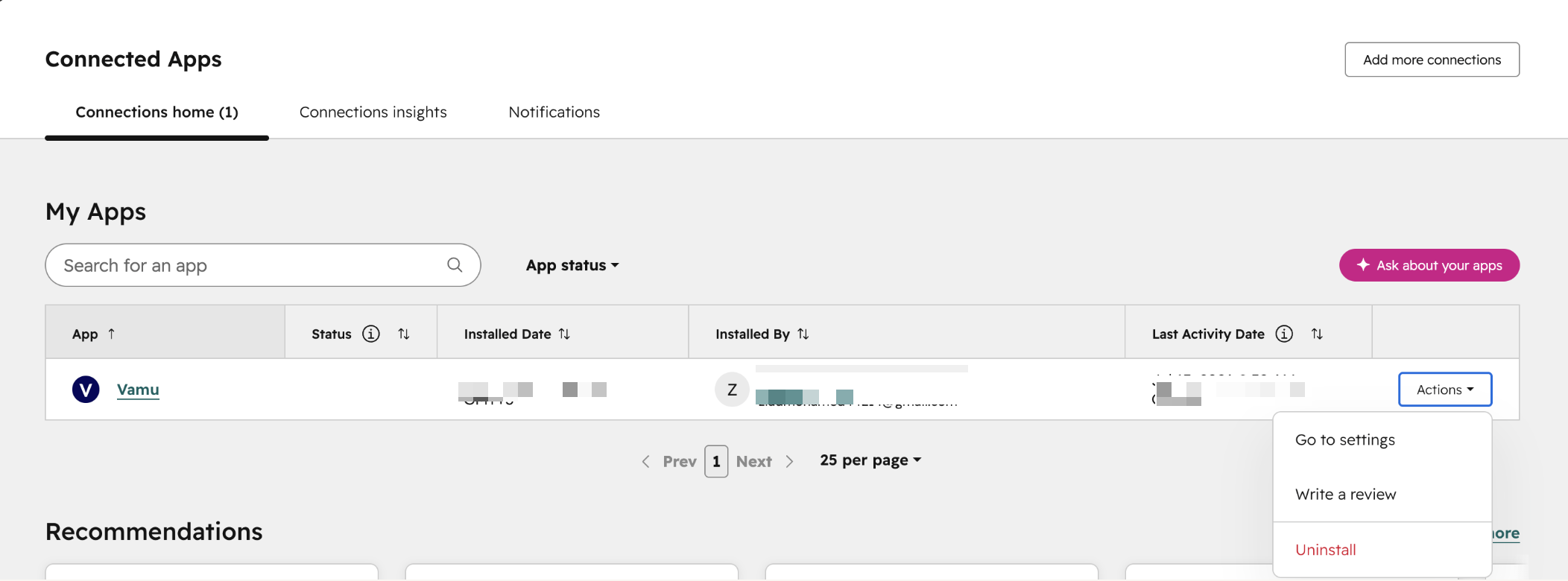
In the left sidebar, go to Integrations → Connected Apps.
-
Find Vamu in the list.
-
Click Actions next to the app, then select Uninstall.
🧪 Reviewer Notes
- Scopes used:
oauth,settings.users.read - A modal flow is used inside Vamu to launch the HubSpot consent screen.